What Is an Encumbrance Certificate (EC)?
An Encumbrance Certificate is a record of registered transactions affecting a property for a chosen period. It can show sales, gifts, mortgages, leases and partitions recorded at the Sub-Registrar Office (SRO). The Tamil Nadu Registration Department provides EC services through TNREGINET.
In Tamil, the EC is commonly called a villangam certificate. A villangam search and an EC search refer to the same record check. Buyers use it to trace registered dealings and look for mortgages or other entries before purchasing land, a plot or a flat.
An EC covers the records and period searched. It does not by itself prove ownership or rule out unregistered claims. Read it alongside the title deeds and Patta Chitta.
Form 15 vs Form 16
The result depends on whether registered entries are found for the specified property and search period.
| Detail | Form 15 | Form 16 |
|---|---|---|
| When it is issued | Registered transactions are found for the property in the search period | No registered transaction is found in the search period |
| Also called | EC with entries or encumbrances | Nil Encumbrance Certificate |
| What it lists | Each deed with its date, document number, parties and value | A statement that no entry was found for the specified search |
A nil EC means no entry was found for that search. Confirm that the property identifiers and dates are correct before relying on it.
When Do You Need an EC?
- Before buying land, a flat or a plot, to review the registered transaction history
- When a bank requests it for a home loan or loan against property
- For a patta transfer after purchase, where it is required among the supporting documents
- When a legal proceeding or property review requires evidence of registered dealings
Check the required search period and certificate format with the office, bank or professional requesting the EC.
How to View EC Online in Tamil Nadu for Free
Use the free Search / View EC service on TNREGINET to search by survey details or document number. Keep the deed or patta nearby so you can copy the village, survey number and subdivision accurately. The earliest available record date can depend on the SRO and its digitised records; check the period displayed on the portal.
Search EC by Survey Number
- Open tnreginet.gov.in and switch to English if needed.
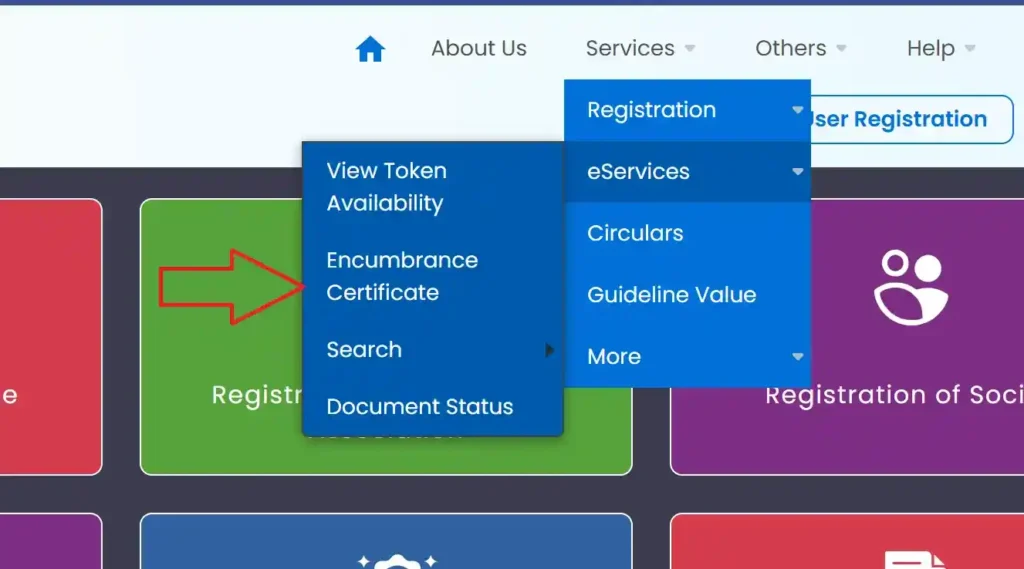
- Open e-Services → Encumbrance Certificate → Search / View EC. In the menu shown below, eServices is under Services. Menu labels may vary.
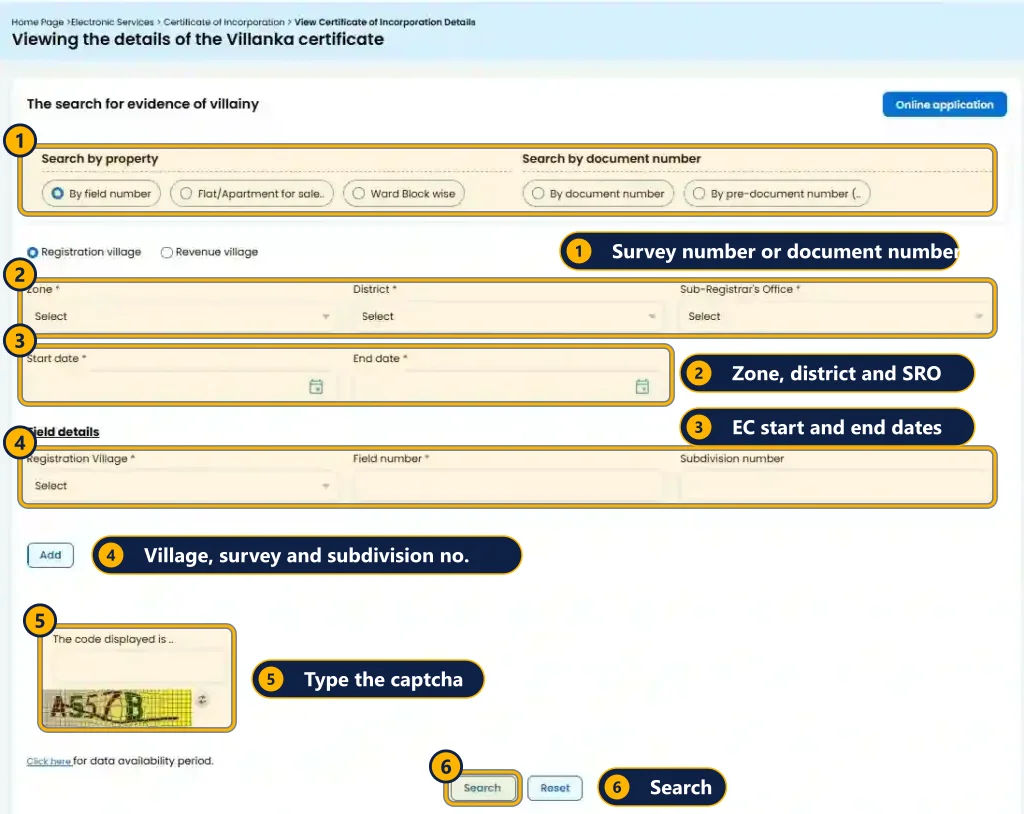
- Select EC as the search type.
- Choose the Zone, District and Sub-Registrar Office.
- Enter the EC start date and end date for the period you need.
- Select the Village, then enter the Survey Number and Subdivision Number. Use Add if you need to include additional survey numbers.
- Enter the captcha and click Search. Check the property details on the result before viewing or saving the available certificate.
Search EC by Document Number
Use Document Wise when you have the registered sale deed number and year but do not have the survey details.
- Under Search / View EC, choose Document Wise.
- Select the Sub-Registrar Office and enter the Document Number, Year and Document Type requested by the form.
- Enter the captcha and click Search. Compare the returned document with the deed you hold.
Choose the SRO that registered the property. If you are unsure, use Know Your Jurisdiction and confirm any older jurisdiction changes with the office. A document-wise result is a check of that document, so also search the property and full period when reviewing its transaction history.
Save the Free EC View as a PDF
Use the download or print option supplied with the result. If the portal opens a printable view, your browser's Print → Save as PDF can save it locally. Keep the selected dates and property details with the file. A browser-saved view does not add a Sub-Registrar's digital signature.
How to Apply and Download a Digitally Signed EC
When a bank, office or property review requires a digitally signed EC, use the application service after logging in. The request is processed by the Sub-Registrar and the completed document is made available through your registered account. The department explains this workflow in its Online EC Application user manual.
- Log in to TNREGINET. New users should complete user registration first.
- Open e-Services → Encumbrance Certificate → Search and Apply EC, or the Apply Online EC option displayed by the portal.
- Enter the zone, district, SRO, search period, village and survey details, then click Search.
- Review the matching property or document details and select Apply Online where offered.
- Enter the applicant and contact details requested by the form, save the application and pay the displayed fee through the official e-payment gateway.
- Keep the Application Number, Bank Reference Number, CIN and Transaction ID shown on your receipt, where provided.
- After processing, log in and open e-Services → Encumbrance Certificate → Request List, or the request/download area in your account. Download the completed signed EC as a PDF.
Check that the downloaded file includes the digital signature information. If it includes a QR code or verification reference, use that facility to verify the certificate. Confirm with the receiving bank or office whether it needs the original PDF, a printed copy or a particular search period.
EC Fees, Processing Time and Validity
Viewing EC details through the free service costs nothing. A signed EC application has charges based on the requested search. Use the indicative breakdown below to estimate the cost, then confirm the applicable fee in TNREGINET's Duty and Fees section and on the payment screen.
| Fee item | Indicative amount |
|---|---|
| Application fee | ₹1 |
| Search fee, first year | ₹15 |
| Search fee, each additional year | ₹5 per year |
| Additional computerised-record fee, where applicable | ₹100 |
Example: using these rates, a 13-year search with the additional ₹100 charge would total ₹1 + ₹15 + (12 × ₹5) + ₹100 = ₹176. This is an illustration; pay the amount assessed for your actual request.
- Processing time: allow time for Sub-Registrar processing. The period depends on record availability, the office and any clarification needed; check the request status rather than assuming a fixed delivery date.
- Validity: an EC records the period it covers. It does not automatically include transactions registered afterwards. Banks may ask for a recently issued certificate with a search ending close to the transaction date.
- How many years to search: 13 years is a commonly used initial period, while lenders or title reviews may request 30 years or longer. Confirm the requirement for your property instead of treating either period as a universal rule.
For the property's government valuation, see our Guideline Value guide. Registration charges are explained separately in the Stamp Duty Calculator.
How to Check EC Application Status
Log in to TNREGINET and open e-Services → Encumbrance Certificate → Request List, or the account's EC request section. Find your application reference and check whether it is pending, requires action or is complete. Download the signed PDF when the download option becomes available.
- Payment status: if money was debited but no request appears, check E-Payment → Payment Status using your transaction reference. Keep the receipt and contact the official helpdesk or SRO before making a duplicate payment.
- Offline application: use the acknowledgement number to enquire at the SRO where you applied.
How to Read an EC
Each entry refers to a registered document. Read the entries in date order and compare the chain of transfers with the seller's title deeds. Check the property description on every relevant entry, not only the owner names.
| Column | What to check |
|---|---|
| Document number and date | Match these with the sale deed supplied by the seller |
| Nature of document | Identify sales, mortgages, gifts, settlements, leases and releases |
| Executant and claimant | Check who transferred the interest and who received it |
| Market value and consideration | Compare the values recorded in the deed |
| Survey number, subdivision and extent | Match these with the deed, patta and the property you are checking |
Investigate a mortgage without a corresponding release, a transfer inconsistent with the seller's deeds, or a survey number that differs from the Patta Chitta. A release may be recorded separately; ask for the supporting deed and confirm the entries with the SRO before completing a purchase.
The FMB Sketch helps compare the plot's survey boundaries and measurements. EC, patta and FMB serve different purposes, so compare them with the registered deeds.
EC Before 1975 and Offline EC
For older periods, including records before 1975, or records unavailable in the online search, contact the SRO that registered the property. Online coverage depends on digitisation; the portal's earliest selectable date does not guarantee that every old deed has been indexed for your survey number.
- Visit the registering Sub-Registrar Office and request the EC application form, commonly referred to as Form 22. Confirm the current form with the office.
- Provide the property description, survey and subdivision numbers, village, known document numbers and the exact search period.
- Carry the title deed copy and ID proof, and submit any supporting documents requested by the office.
- Pay the assessed fee and keep the Acknowledgement Slip for collection and status enquiries.
The office searches the available registers and issues the appropriate certificate, with entries or a nil result. A manual search can take longer than a computerised request, so arrange it early when preparing for a purchase.
Common EC Search Errors and Fixes
| Problem | Likely reason | Fix |
|---|---|---|
| No records found | Wrong SRO, village, subdivision or date range | Confirm the SRO using Know Your Jurisdiction and copy the survey details from the deed. Check the period covered by online records. |
| A known sale is missing | A different survey number, SRO or record period | Search by document number and year. Ask the registering SRO if the deed is still missing. |
| Captcha error | Incorrect code or an expired session | Refresh the captcha or page and enter the new code. |
| Payment debited, no EC request | Payment gateway or request update delay | Check E-Payment → Payment Status using the transaction ID before paying again. Keep the bank reference. |
| Signed EC not in Request List | Sub-Registrar processing is pending | Check the request status and any SMS notification. Contact the SRO with your application reference if it remains pending. |
| Page opens in Tamil | Portal language setting | Select the English option at the top of the portal. |
Keep screenshots of error messages and payment receipts. For official assistance, use the contact details on TNREGINET or the registering SRO, giving your application reference and search details.
Frequently Asked Questions
Is EC view online free in Tamil Nadu?
Searching and viewing EC details through the free TNREGINET service costs nothing. Applying for a digitally signed EC is a separate service; check the fee shown before payment.
Is villangam certificate the same as EC?
Yes. Villangam certificate is the Tamil name commonly used for an Encumbrance Certificate. It records registered transactions for a specified property and period.
How many years of EC should I check before buying land?
A 13-year search is often used as an initial check, while a lender or title review may require 30 years or longer. Ask your bank or property lawyer for the period needed for your transaction; neither period guarantees clear title.
Can I get EC online for records before 1975?
Check the earliest date offered for your SRO on TNREGINET. Older records, including periods before 1975, may require a manual search at the registering Sub-Registrar Office. Ask the office which records have been digitised.
Is the digitally signed EC accepted for a bank loan?
Banks may accept a digitally signed EC, subject to their document requirements. Confirm the search period, issue date and certificate format with your lender before applying.
Is EC available on the patta chitta portal?
EC is a Registration Department record obtained through TNREGINET. Patta and chitta are Revenue Department records obtained through TN eServices. Compare both when checking property details.