How to Check Patta Chitta Online Status
You only need the application ID to check patta status. It is printed on the acknowledgement you received when applying online or at an e-Sevai centre.
- Open eservices.tn.gov.in.
- On the home page, click Application Status (also shown as Know Your Application Status).
- Enter your Application ID.
- Type the authentication value (captcha).
- Click Get Status to see the current stage of your request.
If the status says Approved, go to View Patta & FMB / Chitta / TSLR Extract and download the new patta in your name. Our guide to viewing Patta Chitta online shows how to save and verify it.
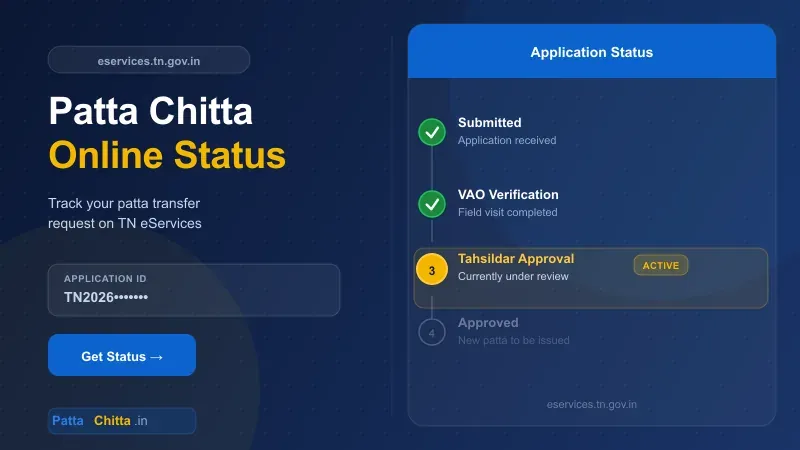
What Each Patta Status Means
A patta transfer passes through a few offices before it is approved. The status tells you which office has your file right now and what you should do.
| Status | What it means | What you should do |
|---|---|---|
| Submitted / Pending | Application received, not yet picked up | Wait a few days and check again |
| Under verification (VAO) | Village Administrative Officer is checking records, sometimes with a field visit | Keep your phone on; the VAO may call or visit |
| Survey / subdivision in progress | A surveyor is measuring the land for a split | Be present at the site on the survey date |
| Pending with Tahsildar | File sent to the Tahsildar or Zonal Deputy Tahsildar for approval | Wait for the decision |
| Returned for correction | A document or detail is missing | Fix it and resubmit quickly |
| Approved | New patta issued in your name | Download the new patta online from View Patta |
| Rejected | Request refused, reason given | Read the reason and apply again with the correct papers |
How to Apply for Patta Transfer Online
You can apply for a patta transfer online on TN eServices or at any e-Sevai centre. In many sales of a whole survey number, the patta moves to the buyer automatically after registration — check the patta online a few days after registering before you apply manually.
- Open eservices.tn.gov.in and choose Apply Online Patta Transfer.
- Register with your mobile number and verify it with the OTP.
- Fill in the district, taluk, village, survey number and the reason for transfer — sale, gift, inheritance or partition.
- Upload the required documents (see below).
- Pay the fee online and save the acknowledgement with your Application ID.
Documents Needed
- Registered sale deed, gift deed or partition deed
- Encumbrance Certificate for the property
- Previous patta of the seller
- ID proof such as Aadhaar
- Latest land tax or property tax receipt
- For inheritance: death certificate and legal heir certificate
Patta Transfer Fees and Time Taken
The online patta transfer fee is small — commonly around ₹100 — and e-Sevai centres add a service charge. Subdivision cases cost more because a surveyor must measure the land. The portal shows the exact fee before payment.
| Case | Usual time |
|---|---|
| Whole survey number sold (no subdivision) | Often automatic after registration, or a few days |
| Online application, no subdivision | About 15 to 30 days |
| Transfer with subdivision | Longer — a surveyor must measure the land first |
| Inheritance with several legal heirs | Longest — depends on heir documents and field inspection |
These timelines are typical, not fixed. Check the status every week, and act fast if it shows Returned for Correction.
TamilNilam and Patta Chitta EC Status
TamilNilam is the Tamil Nadu Revenue Department's land records system that runs behind patta transfers. Its official mobile app (TAMILNILAM) lets you view A-Register extracts and track the status of an online patta transfer — the same details shown on TN eServices.
Patta chitta EC online status is a common search, but these are two separate requests with separate portals:
- Patta transfer status: check on eservices.tn.gov.in with the application ID.
- EC application status: check on tnreginet.gov.in under E-Services → Encumbrance Certificate → Request List.
Application Rejected or Delayed: What to Do
- Rejected: read the reason shown with the status. Common causes are a missing EC, a name mismatch between the deed and ID, or an unclear previous patta. Fix the issue and file a fresh application.
- Stuck for over a month: visit the VAO with your application ID, then the Taluk office if nothing moves.
- Wrong details in the new patta: apply for a correction at the Taluk office with the sale deed and the approved patta.
- Application ID lost: check the SMS on the mobile number you used, or ask the e-Sevai centre that filed the application.
Frequently Asked Questions
How do I check patta transfer application status?
Open eservices.tn.gov.in, click Application Status, enter your application ID and the captcha, then click Get Status. The current stage of your request appears on screen.
How many days does a patta transfer take?
A simple transfer without subdivision usually takes about 15 to 30 days. Cases with subdivision or several legal heirs take longer because of field surveys and additional document checks.
Is patta transferred automatically after registration?
Often yes, when a whole survey number is sold without subdivision. Check the patta online a few days after registration. If your name does not appear, apply for transfer manually through TN eServices.
Can I check patta status without the application ID?
No. The application ID is required. Find it in the acknowledgement SMS or the printout from the e-Sevai centre where you applied.
Where do I apply for patta transfer online?
Apply on eservices.tn.gov.in using Apply Online Patta Transfer, or visit an e-Sevai centre with the sale deed, EC, previous patta and ID proof.